
Random Color Generator: Free Hex, RGB and Palette Picks
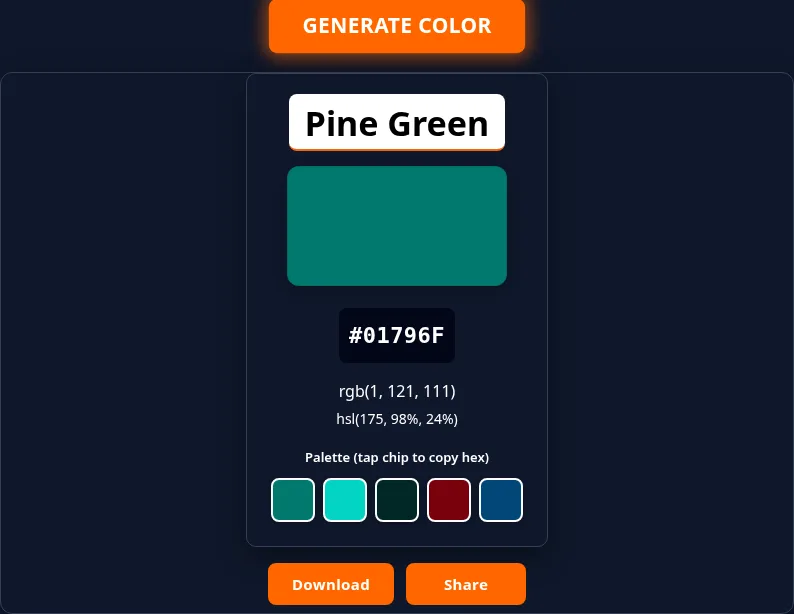
This free random color generator picks a named color, shows a swatch, and gives you hex, RGB, HSL and a five-color palette you can copy in one tap. Hit Generate Color for another.
Need a random color for a mockup, a CSS token or a classroom palette game? One tap might land on Coral (#FF7F50) with a lighter tint, a darker shade, a complement and an analogous neighbor. The next might give you Prussian Blue with codes ready for a stylesheet.
How to Use It
No upload, no account, one button.
- Open the page. The tool sits near the top.
- Tap Generate Color. A named color card loads with a swatch.
- Read the codes. You get the hex code, RGB and HSL for the same color.
- Use the palette. Five chips: base, lighter, darker, complement and analogous.
- Copy what you need. Tap a palette chip to copy its hex. Download saves a PNG of the card, and Share opens your device share menu, or copies the name, hex, RGB and HSL as text if your device has no share menu.
Want a shortlist? Generate three colors, paste each hex into your notes, then keep the set that still looks good when you squint.
What You Get on Every Card
The list holds 673 named colors, each with its own hex code.
- Name: a human-friendly label, matched to one exact hex.
- Hex: compact
#RRGGBBfor CSS, Figma and most design tools. - RGB: channel values as
rgb(r, g, b)for canvas, print handoff notes or code. - HSL: hue, saturation and lightness, handy when you want to nudge brightness by hand.
- Palette: five related hexes built from the base color, not five unrelated random draws.
Hex to RGB (and Back) in Plain English
A hex code packs the same three channels RGB uses.
#FF7F50means red 255, green 127, blue 80 →rgb(255, 127, 80).- Each pair is base-16:
FF= 255,7F= 127,50= 80. - Going the other way, keep each channel between 0 and 255 and write it as two hex digits.
HSL is a different view of the same color: turn the hue, then ease saturation and lightness. The palette’s lighter and darker chips move lightness while keeping the hue. The complement jumps the hue by 180 degrees, and the analogous chip steps it by 30 degrees. For the formal CSS color functions, see MDN: color value.
Example Colors From the List
These twelve rows are real entries from the tool’s list (name, hex, RGB). They are a sample, not the full list.
|
Name |
Hex |
RGB |
|---|---|---|
|
Coral |
#FF7F50 |
rgb(255, 127, 80) |
|
Emerald |
#50C878 |
rgb(80, 200, 120) |
|
Navy |
#000080 |
rgb(0, 0, 128) |
|
Saffron |
#F4C430 |
rgb(244, 196, 48) |
|
Tiffany Blue |
#0ABAB5 |
rgb(10, 186, 181) |
|
Prussian Blue |
#003153 |
rgb(0, 49, 83) |
|
Rose Gold |
#B76E79 |
rgb(183, 110, 121) |
|
Neon Green |
#39FF14 |
rgb(57, 255, 20) |
|
Burnt Sienna |
#E97451 |
rgb(233, 116, 81) |
|
Ultramarine |
#120A8F |
rgb(18, 10, 143) |
|
Jade |
#00A86B |
rgb(0, 168, 107) |
|
Scarlet |
#FF2400 |
rgb(255, 36, 0) |
When a Random Palette Helps
A random palette is useful when you are stuck in the same three brand blues, need placeholder tokens for a wireframe, or want a classroom prompt that is not “pick your favorite color.” The five chips are built from one base color, so they usually hold together better than five unrelated picks.
It is less useful when you already have a photo, logo or brand book. Then you want to sample colors from that source, not start from a random base.
What This Tool Does Not Do
- From an image: it does not upload or sample photos. Use an image palette extractor for that, then compare with a random pick here if you like.
- Wheel or eyedropper: there is no hue wheel to drag. It generates a color and lets you copy it.
- Search by name: you can’t type “coral” to get its codes; every pick is random.
- From words: it does not turn text into colors.
If you need image extraction or a wheel-style palette builder, use a tool made for that. Come back here when you want a named random color with codes and a small matching palette.
Minecraft Colors: Hex vs Dye vs Bedrock
If you want a color for Minecraft, here is what a web hex can and can’t do.
- Java Edition (1.16+) accepts arbitrary hex in many JSON text components (
"color": "#RRGGBB"). A hex from this tool can feed resource packs, maps or external editors. - Bedrock does not allow arbitrary hex chat colors. It uses a fixed set of § formatting codes (the classic colors plus Bedrock’s material colors).
- Dyes in both editions are a fixed set of sixteen colors. Armor, banners, collars and sheep use dye tables, not any web hex. Values and quirks are documented on the Minecraft Wiki dye page and the formatting codes page.
So copy the hex for Java creative work, but don’t treat this tool as a Bedrock dye menu or a §-code cheat sheet.
Paste the Codes Into CSS or Design Tools
Once you have copied a color, a typical CSS setup looks like this:
:root {
  --accent: #FF7F50;
  --accent-rgb: 255, 127, 80;
}
.button {
  background: var(--accent);
  color: #000000; /* match readable text to the swatch */
}
Or paste rgb(255, 127, 80) into a canvas fill, a design token file or a team chat. Tap each palette chip in turn to copy its hex, then paste it into your token file.
Frequently Asked Questions
Is it free?
Yes. It’s free, with no sign-up and no paywall.
How do I copy the codes?
Tap a palette chip to copy that chip’s hex. For the main color, press Share: on a device without a share menu it copies the name, hex, RGB and HSL as text. Download saves the card as a PNG.
Can I upload an image to make a palette?
No. It can’t pull colors from a photo. Use an image palette tool for that.
Is there a color wheel?
No. It picks a named color for you; use your design app if you need to drag a hue.
Does it check contrast or accessibility?
No. It doesn’t run a WCAG contrast check. Test any text and background pair in a contrast checker before you use it.
Can I get the same color twice?
Yes. Each tap is a fresh random pick from the full list, so a repeat is possible, though with 673 colors it is rare.