
Wheel Spinner to Pick a Random Name or Choice in One Spin
This wheel spinner turns your list into a colorful wheel and picks one entry at random. Type names, numbers or ideas one per line, or load a preset, then press Spin the Wheel. It works as a random name picker, a decision wheel and a prize wheel, free and with no signup.
Use the wheel spinner when a choice needs to feel fair and a bit fun: who goes first, what to eat, which student answers, which chore you get. Everyone can watch the wheel slow down, so nobody can say the result was rigged.
How to Use the Wheel Spinner
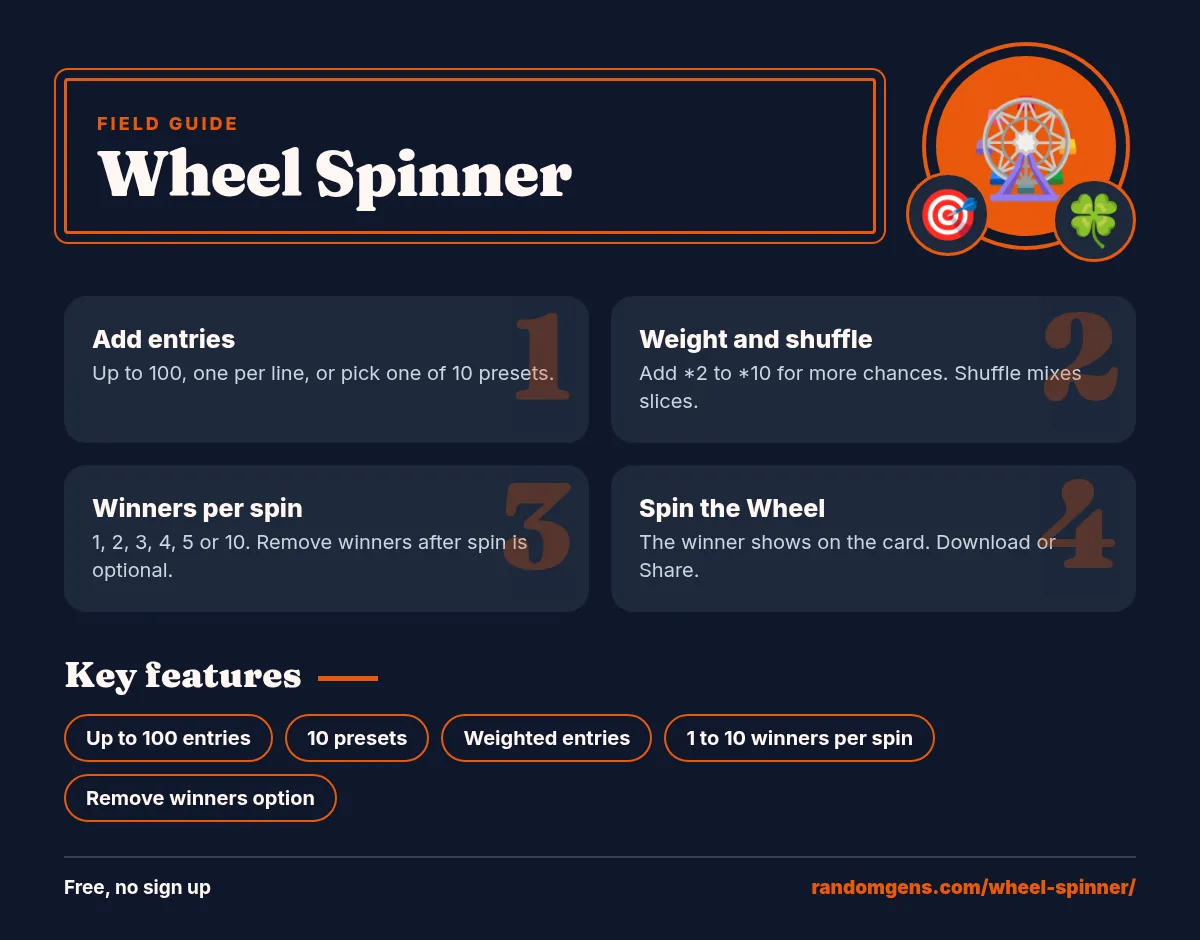
- Add your entries. Type one per line in the box, or choose a preset such as Yes or No or Food for dinner.
- Shuffle if you like. The Shuffle button mixes the slice order.
- Choose the mode. Tick Remove winner after spin to take each winner off the wheel.
- Spin the wheel. Press Spin the Wheel. The card shows the winner, how many entries are left and your last ten spins.

Ten Ready Made Wheels
Presets save typing. Each one loads straight into the box, and you can edit it before you spin:
- Yes or No wheel for quick decisions.
- Number wheel 1 to 10 for games and turns.
- Letter wheel A to Z for word games like Scattergories.
- Food for dinner with 12 meals.
- Truth or Dare with a Your choice and a Skip slice.
- Days of the week, Colors, Weekend activity, Classroom names and Chores.
Popular Ways to Use a Spinning Wheel
Random name picker for teachers
Paste the class list and turn on Remove winner after spin. Each student is picked once, in a random order, and the class can see the spin wheel on the board. It feels fairer than calling on the same hands.
Decision wheel at home
Cannot decide on dinner, a movie or a weekend plan? Put the options on the wheel spinner and let it choose. If the result feels wrong, that tells you what you really wanted.
Giveaways and raffles
Paste entrant names, set Winners per spin to 3 for first, second and third place, and turn on Remove winners after spin so nobody wins twice. Screen record the spin so your audience can check it.
Games and parties
Pick who goes next in truth or dare, choose a category for charades, or assign teams. A random wheel adds a bit of drama that a plain list does not.
Is the Spin Really Random?
Yes. When you press the button, the wheel spinner picks the winning slice first with the crypto random function built into your browser, the same source used for secure codes. Then it animates the wheel so it stops on that slice. Slice order, spin speed and how long it spins do not change the odds. With 8 equal entries, each has a 1 in 8 chance on every spin. If you add weights, the chance of each entry equals its weight divided by the total weight, and the card shows that percentage. Extra winners are drawn from the remaining entries with the same weights.
Tips for a Better Wheel
- Keep labels short. Long text is cut at 16 characters on the slice, but the full entry shows on the result card.
- Weight an entry by adding *2 to *10 after it, such as Truth *2. The slice grows to match, so the wheel shows the real odds.
- Use Shuffle before a live spin so the order looks fresh.
- For large ranges of numbers, use the random number generator instead of typing hundreds of lines.
Spin the Wheel for Any Choice
A wheel spinner works for almost any list. Spin the wheel to pick a restaurant, a board game, a workout, a book from your shelf or a person to buy a gift for. Because every spin is fair, it is a calm way to settle small arguments in a family or office.
Many people search for a random generator wheel when they mean the same thing: a picker wheel that turns a list into a random choice. Others want a number generator wheel for bingo or classroom games. This wheel spinner covers both. Type your options, or load the Numbers 1 to 10 preset, and spin the wheel as many times as you need.
Wheel Spinner for Teachers and Streamers
- Random name picker: paste a class list once, tick Remove winner, and each spin of the wheel spinner calls a new student.
- Group maker: spin to place students in groups one by one.
- Quiz topics: put topics on the wheel and spin before each round.
- Live giveaways: show the wheel spinner on stream so viewers see the winner land.
- Reward wheel: add small prizes like extra break time or a sticker.
Teachers often keep a few saved lists in a document so they can paste them into the wheel spinner at the start of each class. It takes seconds and the random name picker feels fair to students because they can watch it spin.
Honest Limits
- No saved wheels. Lists are not stored after you leave the page.
- 100 entries max. Bigger lists get hard to read on a wheel.
- No sound or custom colors in this version.
- Weights from 1 to 10. Higher numbers are capped at 10 so one entry cannot swamp the wheel.
Want to go deeper than the wheel spinner? Read MDN Web Docs: Crypto.getRandomValues().
Frequently Asked Questions
Is the wheel spinner fair?
Yes. The winner is picked first with your browser’s secure random number function, then the wheel animates to land on it. Every entry has the same chance.
How many entries can I add?
Up to 100 entries, one per line. The text on each slice gets smaller as you add more, so short labels read best.
Can I remove a name after it wins?
Yes. Tick Remove winner after spin. The winning entry is deleted from the list, which is handy for picking students or raffle winners in order.
Does the wheel save my list?
No. The list lives in the box on the page. Copy it somewhere safe if you want to reuse it, or pick a preset next time.
What presets are included?
Yes or No, Numbers 1 to 10, Letters A to Z, Food for dinner, Truth or Dare, Days of the week, Colors, Weekend activity, Classroom names and Chores.
Can I use it as a random name picker in class?
Yes. Paste your class list, tick Remove winner after spin, and spin. Project the page so students can see the result.
Can I make a number wheel?
Pick the Numbers 1 to 10 preset or type any numbers, one per line. For big ranges, the random number generator is faster.
Can I share the result?
Yes. Download saves the result card as a PNG image and Share opens your device share menu where supported.